# Elementor config

## A. Settings

&#x20;**Step 1** - Log in to your WordPress Administration Panel (Dashboard)

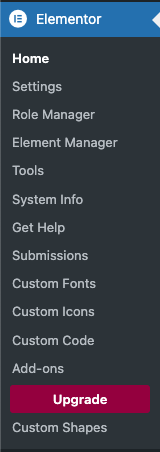
&#x20;**Step 2** - Click the ' **Elementor**.

<figure><img src="https://content.gitbook.com/content/TV63t1wLRDJ4HJYcQG2M/blobs/eDTCMESbOMB6xWswLwCU/Screenshot%202024-07-31%20at%2013.33.56.png" alt=""><figcaption></figcaption></figure>

&#x20;**Step 3** - Click the '**Settings**'.

&#x20;**Step 4** - You will see all tabs for setting of elementor , in General tab

![](https://682922471-files.gitbook.io/~/files/v0/b/gitbook-x-prod.appspot.com/o/spaces%2FTV63t1wLRDJ4HJYcQG2M%2Fuploads%2FdeTvaNF93pDZo97ZoUFC%2FScreenshot%202025-06-13%20at%2015.56.43.png?alt=media\&token=f2da503c-1817-42f1-a502-b1aab278744f)

**Step 5** - Intergrations and Advanced display config for elementor.

## **B. Tools controls**‌

&#x20;**Step 1** - Log in to your WordPress Administration Panel (Dashboard)

**Step 2** - Click the ' **Elementor**' tab.

**Step 3** - Click the '**Tools**.

**Step 4** - You will see config for set up control for elementor , with General controls tab.

![](https://gblobscdn.gitbook.com/assets%2F-MGbFxd9X6wS6x8pAOzM%2F-MGbh0K9IWDSCjGnPV-x%2F-MGbj9g4EaQui5VNOYPp%2FScreenshot_140.png?alt=media\&token=ef9b21ce-2913-41e4-9a84-924d81c4eb8b)

**Step 5** - Editor Replace URL tab: display config for site address....

![](https://gblobscdn.gitbook.com/assets%2F-MGbFxd9X6wS6x8pAOzM%2F-MGbh0K9IWDSCjGnPV-x%2F-MGbjF4nWG5k_WfSQezR%2FScreenshot_141.png?alt=media\&token=9b7b27c0-a59e-4468-ab64-6e7010db7b56)

**Step 6** - Version control: display config for elementor.

![](https://gblobscdn.gitbook.com/assets%2F-MGbFxd9X6wS6x8pAOzM%2F-MGbh0K9IWDSCjGnPV-x%2F-MGbjPbWDOJtq7FouctR%2FScreenshot_142.png?alt=media\&token=013b51b2-e7d5-4a4e-a0bd-6e067cf3811c)

**Step 7** - Maintenance Mode: display config for elementor.

![](https://gblobscdn.gitbook.com/assets%2F-MGbFxd9X6wS6x8pAOzM%2F-MGbh0K9IWDSCjGnPV-x%2F-MGbjWmI93iYS5M0oSUD%2FScreenshot_143.png?alt=media\&token=15c9ddf1-55ff-4528-8999-8e0dc4da7f5f)

Step 8 - Improt/Export Kit

<figure><img src="https://682922471-files.gitbook.io/~/files/v0/b/gitbook-x-prod.appspot.com/o/spaces%2FTV63t1wLRDJ4HJYcQG2M%2Fuploads%2FwdgWZkKTJJUohf1FjMdi%2Fimage.png?alt=media&#x26;token=3657a53e-1ff6-46cf-8335-340254b0bc11" alt=""><figcaption></figcaption></figure>