> For the complete documentation index, see [llms.txt](https://docs.pavothemes.com/edudeme/llms.txt). Markdown versions of documentation pages are available by appending `.md` to page URLs; this page is available as [Markdown](https://docs.pavothemes.com/edudeme/setting/button.md).

# Button

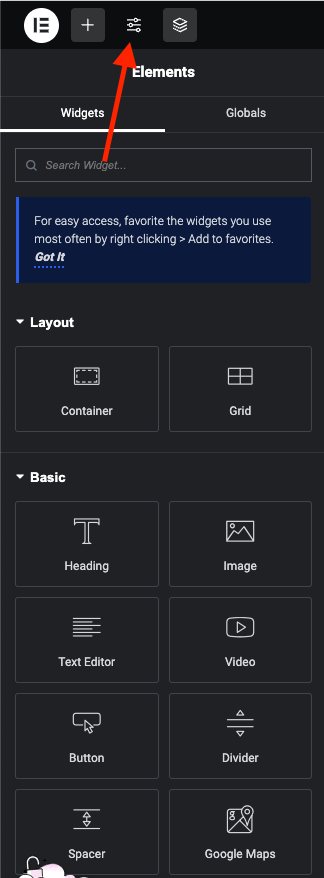
**Step 1** - you can go to any elementor edit page.

<figure><img src="/files/eN69vtqUqtZCqoLLmHxL" alt=""><figcaption></figcaption></figure>

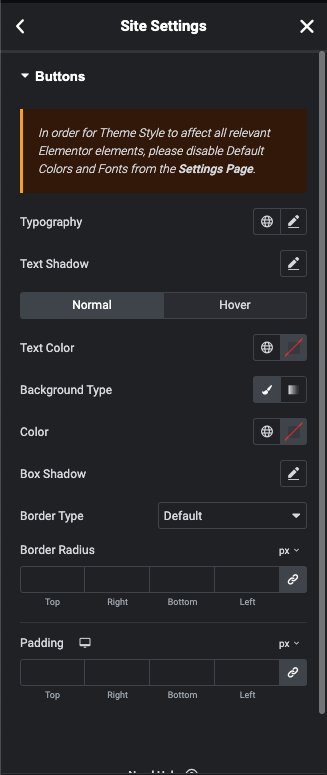
**Step 2** - Site Settings >> Button >>

<figure><img src="/files/4PAiYBVJ3JDaRJ6b4jOx" alt=""><figcaption></figcaption></figure>

**Step 3** - Settings Button for your site

**Front end look like**&#x20;

<figure><img src="/files/wEzEBqzX22WmxpkbDbJo" alt=""><figcaption></figcaption></figure>

<figure><img src="/files/mYz1kezPdyMXyeNgZ9Ui" alt=""><figcaption></figcaption></figure>

Hover&#x20;

<figure><img src="/files/S2vIQXJRzXQWM0wbcyhj" alt=""><figcaption></figcaption></figure>